자바스크립트 수업 내용 정리
구조화된 HTML 문서 작성
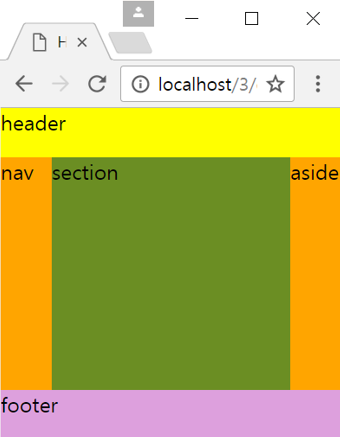
<!DOCTYPE html>
<html lang="en">
<head>
    <meta charset="UTF-8">
    <meta name="viewport" content="width=device-width, initial-scale=1.0">
    <title>Document</title>
    <style>
        html, body{
            margin: 0; padding: 0; height: 100%;
        }
        header{
            width: 100%; height: 15%; float: left; background-color: yellow;
        }
        nav{
            width: 15%; height: 70%; float: left; background-color: orange;
        }
        section{
            width: 70%; height: 70%; float: left; background-color: olivedrab;
        }
        aside{
            width: 15%; height: 70%; float: left; background-color: orange;
        }
        footer{
            width: 100%; height: 15%; clear: both; background-color: plum;
        }
    </style>
</head>
<body>
    <header>header</header>
    <nav>nav</nav>
    <section>section</section>
    <aside>aside</aside>
    <footer>footer</footer>
</body>
</html>
폼 요소의 그룹핑
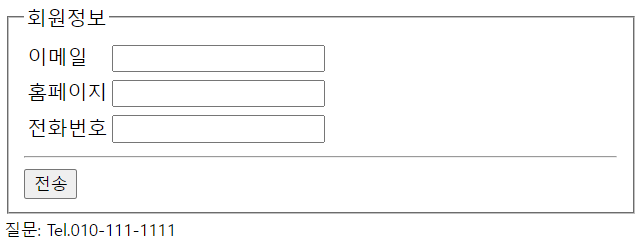
<!DOCTYPE html>
<html lang="en">

<head>
    <meta charset="UTF-8">
    <meta name="viewport" content="width=device-width, initial-scale=1.0">
    <title></title>
</head>

<body>
    <form>
        <fieldset>
            <legend>
                회원정보
            </legend>
            <table>
                <tr>
                    <td><label for="email">이메일</label></td>
                    <td><input type="email" name="emial"></td>
                </tr>

                <tr>
                    <td><label for="homep">홈페이지</label></td>
                    <td><input type="url" name="homp"></td>
                </tr>

                <tr>
                    <td><label for="tel">전화번호</label></td>
                    <td><input type="tel" name="tel"></td>
                </tr>

            </table>

            <hr>
            <input type="submit" value="전송">

        </fieldset>
        <small>질문: Tel.010-111-1111</small>
    </form>
</body>

</html>
링크의 target 속성 활용
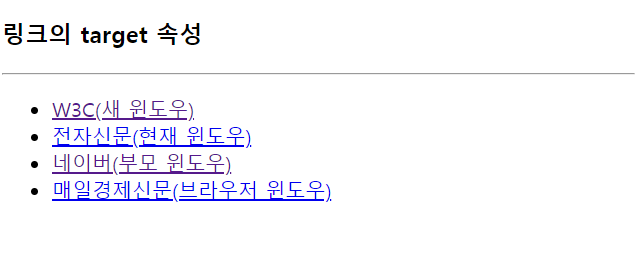
<!DOCTYPE html>
<html lang="en">
<head>
    <meta charset="UTF-8">
    <meta name="viewport" content="width=device-width, initial-scale=1.0">
    <title>Document</title>
</head>
<body>
   <h3>링크의 target 속성</h3>
   <hr>
   <ul>
       <li><a href="https://www.w3.org" target="_blank">W3C(새 윈도우)</a></li>
       <li><a href="https://www.etnews.com" target="_self">전자신문(현재 윈도우)</a></li>
       <li><a href="https://www.naver.com" target="_parent">네이버(부모 윈도우)</a></li>
       <li><a href="https://www.mk.co.kr" target="top">매일경제신문(브라우저 윈도우)</a></li>
   </ul>
</body>
</html>
ifrmae 활용
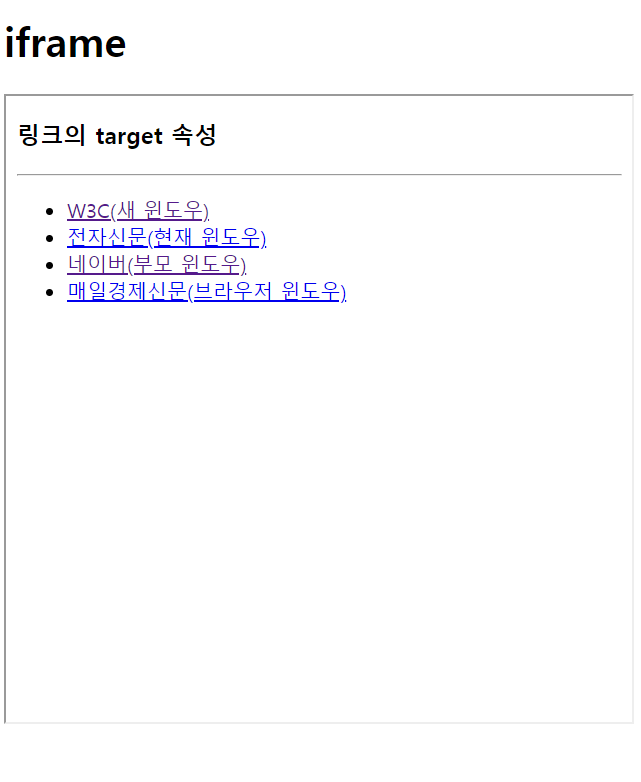
<!DOCTYPE html>
<html lang="en">
<head>
    <meta charset="UTF-8">
    <meta name="viewport" content="width=device-width, initial-scale=1.0">
    <title>Document</title>
</head>
<body>
    <h1>iframe</h1>
    <iframe src="skeleton.html" width="600" height="500"></iframe>
</body>
</html>
Leave a comment